Store View Readiness Check for Magento 2
Spot overlooked content while keeping intentional reuse under your control.
Download the user guide (PDF) · Download version 1.0.0
Compatibility
Tested on Magento Open Source 2.4.9 / PHP 8.4. These are native Admin diagnostics: no Luma or Hyva storefront adapter is required. Other editions and Magento versions are not a completed test matrix. Magedia Core ^1.2.1 is required.
Installation
Download the free module without an account or activation. Composer installs the Core dependency automatically:
composer config repositories.magedia-free composer https://store.magedia.com/media/magedia-free-modules/
composer require magedia/m2-store-view-readiness
bin/magento module:enable Magedia_Core Magedia_StoreViewReadiness
bin/magento setup:upgrade
bin/magento setup:di:compile
bin/magento setup:static-content:deploy -f
bin/magento cache:clean
For a ZIP installation, extract the module into app/code/Magedia/StoreViewReadiness and Magedia Core 1.2.1 into app/code/Magedia/Core. Install any missing Composer dependencies, then run the enable, upgrade and deployment commands above. Back up and test your installation before production use.
Run a check
Open Magedia → Store View Readiness Check → Run Checks and View Report.
-
Choose the target store view and a different baseline.
-
Choose products, categories and optional CMS identifiers or attribute codes to review.
-
Review shared content, approve intentional reuse, and edit content in Magento.
Settings
Store View / Baseline Store View — Select two different storefront store views.
SKUs / Entities per Type / Catalog Page — Check explicit SKUs or a stable catalog page; page size 1-200.
Approved Inherited Fields — Suppress selected product/category field warnings. Settings are retained for the current administrator session.
CMS Identifiers — Optional page/block identifiers, one per line; up to 50.
Product Attribute Codes — Optional product attributes, one per line; up to 20.
Features
Scope comparison — Compare product availability and enabled status between target and baseline store views.
Product content — Review names, descriptions, meta fields and base-image labels.
Category content — Compare category names and descriptions for the same category IDs.
Attribute labels — Review store labels and database-backed option labels for selected product attributes.
CMS availability — Check active pages and blocks by identifier and store assignment.
Intentional reuse — Approve selected inherited product/category fields for your administrator session.
Read and export the report
Use the native filters, saved views, sorting and pagination. Export results as CSV or Excel XML. Open Settings leads to native product, category, CMS, attribute or rule editors as relevant. Product/category links preserve the selected store view.
Each administrator sees only their own report. A new run replaces that administrator's previous report. Old reports expire after 30 days when checks run. Configure separate Report and Run Checks ACL permissions under Magento user roles.
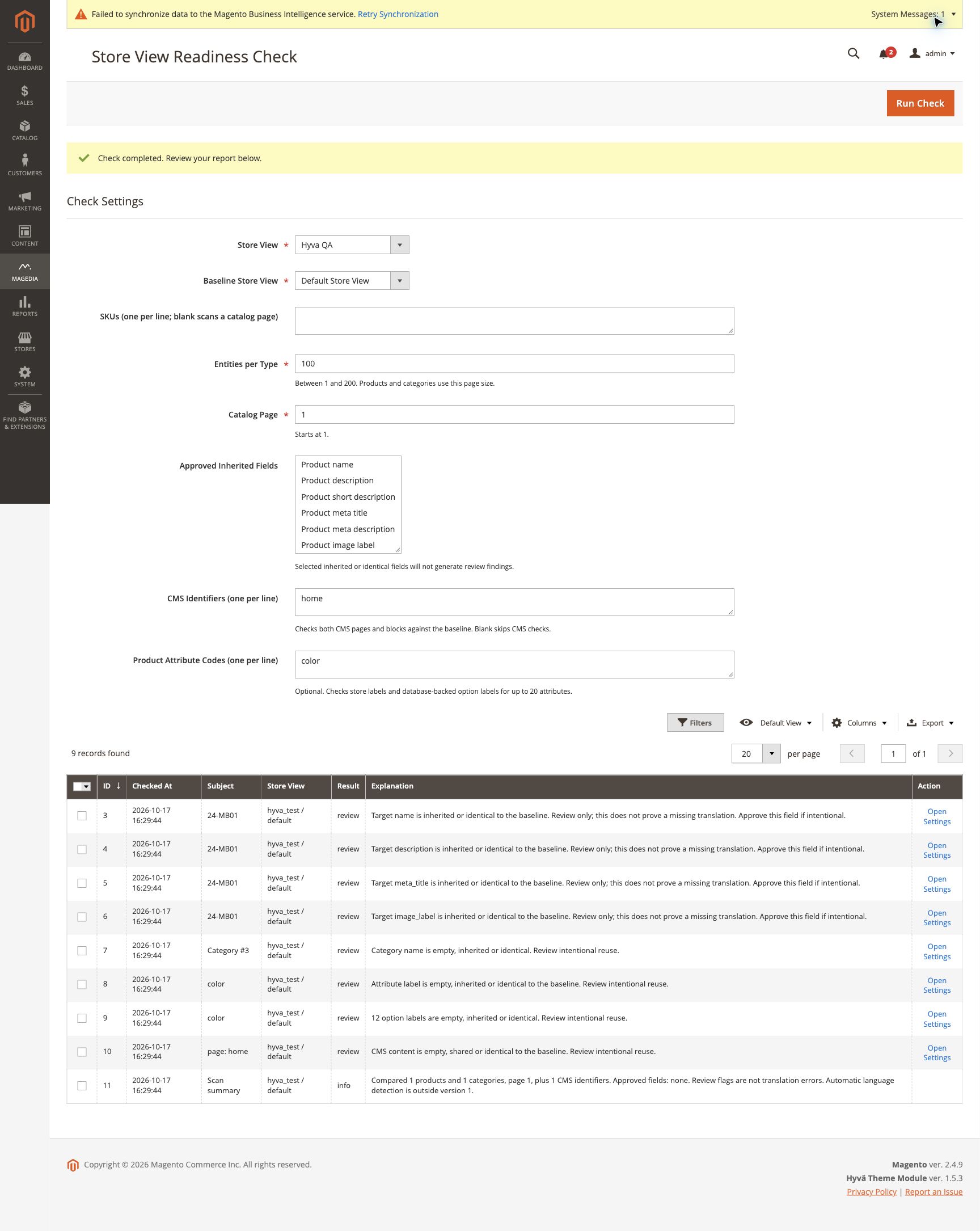
Example
A shared brand name may be correct in every language. Approve that field intentionally while still reviewing descriptions, attribute labels and CMS assignments.
Scope and limitations
Identical or inherited content is a review flag, not proof of an incorrect translation. There is no automatic translation or language detection. Approvals are field-level and session-based, not permanent per-entity approvals. Different category trees are not automatically mapped. Dynamic option sources, email templates and JavaScript translations are outside this release.
Reports are snapshots, not a guarantee of live storefront behavior. There is no automatic catalog, translation or pricing-rule repair. For Promotion Inspector, native totals observers and plugins still run on an unsaved quote; custom integrations require their own compatibility checks. For Store View Readiness, identical content can be intentional and is labelled for review.
Troubleshooting
- No report or Run Check unavailable: check the administrator's module permissions.
- Check failed: review the Magento application log, confirm the selected store and input bounds, then retry.
- Unexpected result: verify the selected scope, publishing settings and native index state. Change settings in native Magento and run the check again.
- ZIP installation cannot resolve Core: install the linked Core package or use Composer so the dependency is resolved automatically.
For help, contact [email protected]. The module is free under OSL-3.0; custom integration and troubleshooting services are separate work.