Promotion Inspector for Magento 2
Explain a native promotion scenario before changing your pricing rules.
Download the user guide (PDF) · Download version 1.0.0
Compatibility
Tested on Magento Open Source 2.4.9 / PHP 8.4. These are native Admin diagnostics: no Luma or Hyva storefront adapter is required. Other editions and Magento versions are not a completed test matrix. Magedia Core ^1.2.1 is required.
Installation
Download the free module without an account or activation. Composer installs the Core dependency automatically:
composer config repositories.magedia-free composer https://store.magedia.com/media/magedia-free-modules/
composer require magedia/m2-promotion-inspector
bin/magento module:enable Magedia_Core Magedia_PromotionInspector
bin/magento setup:upgrade
bin/magento setup:di:compile
bin/magento setup:static-content:deploy -f
bin/magento cache:clean
For a ZIP installation, extract the module into app/code/Magedia/PromotionInspector and Magedia Core 1.2.1 into app/code/Magedia/Core. Install any missing Composer dependencies, then run the enable, upgrade and deployment commands above. Back up and test your installation before production use.
Run a check
Open Magedia → Promotion Inspector → Run Checks and View Report.
-
Enter supported simple or virtual SKUs and quantities, then choose store view and group.
-
Add a coupon or destination facts if needed and click Run Check.
-
Review native rule outcomes and amounts before editing a promotion.
Settings
Store View / Customer Group — Choose the website and audience for the scenario, including guests.
Cart Items — One SKU=quantity per line; up to 20 unique simple/virtual items, quantity 1-100.
Coupon Code — Optional. Valid and invalid coupons are diagnosed without saving the entered code in reports.
Destination Country / Region ID / Destination Postcode — Address facts for native conditions. No shipping charge or method is simulated.
Features
Native calculation — Use Magento’s native totals processor on an unsaved scenario cart.
Rule eligibility — Review active status, website, customer group, date range and coupon selection.
Condition explanations — See native cart-condition decisions and item-action mismatch descriptions.
Discount amounts — Inspect native per-rule item discount amounts in the store currency.
Rule interactions — Review priority, stop-processing settings and items stopped by earlier rules.
Explicit limits — Unsupported shipping, history and custom-rule behavior is clearly identified.
Read and export the report
Use the native filters, saved views, sorting and pagination. Export results as CSV or Excel XML. Open Settings leads to native product, category, CMS, attribute or rule editors as relevant. Product/category links preserve the selected store view.
Each administrator sees only their own report. A new run replaces that administrator's previous report. Old reports expire after 30 days when checks run. Configure separate Report and Run Checks ACL permissions under Magento user roles.
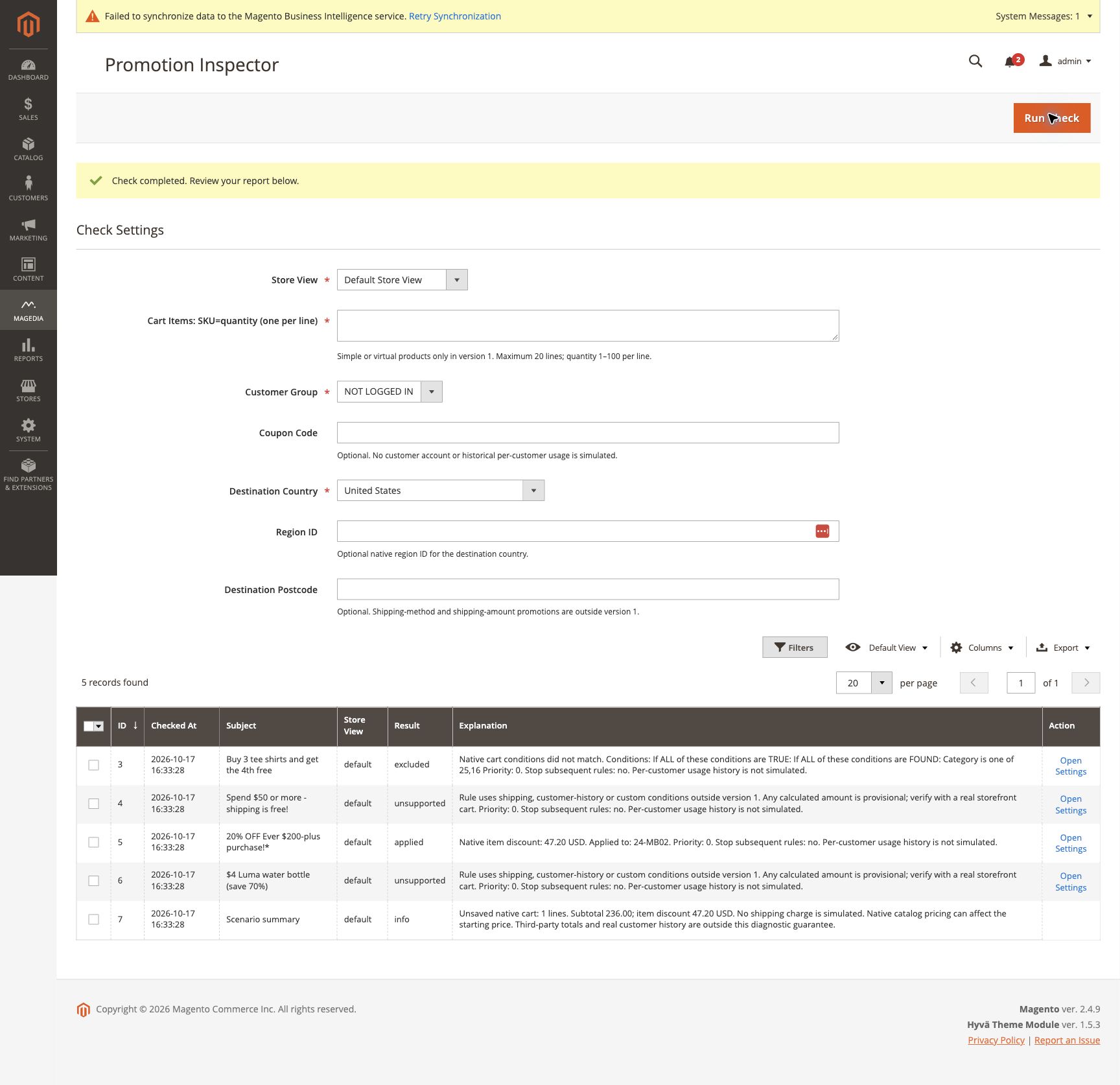
Example
The verified local example uses four 24-MB02 items: USD 236.00 subtotal and a native 20% cart rule producing USD 47.20 item discount.
Scope and limitations
This release targets Magento Open Source 2.4.9’s rule processor. It supports simple/virtual products without required custom options. Real customer usage history, configurable/bundle/grouped/downloadable carts, shipping charges/methods, custom promotion engines and full condition-tree leaf tracing are outside its guarantee. Unsupported rules may affect totals; such totals are provisional.
Reports are snapshots, not a guarantee of live storefront behavior. There is no automatic catalog, translation or pricing-rule repair. For Promotion Inspector, native totals observers and plugins still run on an unsaved quote; custom integrations require their own compatibility checks. For Store View Readiness, identical content can be intentional and is labelled for review.
Troubleshooting
- No report or Run Check unavailable: check the administrator's module permissions.
- Check failed: review the Magento application log, confirm the selected store and input bounds, then retry.
- Unexpected result: verify the selected scope, publishing settings and native index state. Change settings in native Magento and run the check again.
- ZIP installation cannot resolve Core: install the linked Core package or use Composer so the dependency is resolved automatically.
For help, contact [email protected]. The module is free under OSL-3.0; custom integration and troubleshooting services are separate work.