Product Labels
Create text or image badges for product listings and product pages. Use nested conditions, store/customer targeting, schedules, configurable-product policies and draft diagnostics to control what appears.
Download the illustrated user guide (PDF)
Storefront demo · Admin demo (demo / demo) · Product Labels on the Magedia store. Public demo changes reset daily at 03:00 UTC. Illustrations below come from the local test installation.
Installation and compatibility
Requires Magedia Core 1.2 or newer within the 1.x series, Magento MSI, and PHP 8.3–8.5. The implementation targets Magento 2.4.7–2.4.9. Runtime validation covers Magento Open Source 2.4.9 / PHP 8.4, Luma, and official Hyvä Default / Theme Module 1.5.3. Other versions, Adobe Commerce, Varnish and strict CSP configurations require validation in your installation.
After purchase, get your Composer username and password from store.magedia.com → Account → Keys. Save credentials in auth.json, never in source control.
composer config repositories.magedia composer https://repo.magedia.com
composer require magedia/m2-product-labels:^1.0
bin/magento module:enable Magedia_Core Magedia_ProductLabels
bin/magento setup:upgrade
bin/magento setup:di:compile
bin/magento setup:static-content:deploy en_US
bin/magento cache:clean config layout block_html full_page
For ZIP installation, unpack into app/code/Magedia/ProductLabels and install Core separately. Product Labels is disabled by default.
1. Enable and configure
Open Stores → Configuration → Magedia Extensions → Product Labels. Enable Product Labels for the intended store view. Set the maximum labels per product (1–9, default 3) and refresh interval (30–3600 seconds, default 60). Save Config.
2. Create a campaign
Open Magedia → Product Labels → Manage Campaigns → New Campaign. Enter a name, enable the campaign and choose listings, product pages or both. Lower priority numbers run first; campaign ID breaks ties. Stop lower-priority campaigns applies only when this campaign is selected.
Choose store views and customer groups; empty means all. NOT LOGGED IN targets guests. Active from is inclusive and Active until is exclusive; both are explicitly UTC. Preview a disabled draft after temporarily checking Enable campaign without saving.
3. Design the badge
Choose Text or Image; seven palette colours, three shapes and nine positions are available. Sale, New arrival, Low stock and Premium presets populate text/colours/shape only; they do not add conditions.
Custom colours use full #RRGGBB. Choose Arial, System or Georgia; desktop font size 8–48 px, mobile size 8–32 px below 768 px, padding 0–24 px and image width 24–240 px. Separate listing and product-page positions are supported.
Upload PNG, JPEG, GIF or WebP up to 2 MB and enter alternative text. Optional separate product-page artwork overrides the main image only on product pages; clear its path to restore fallback. Wait for the native image uploader to finish before previewing. Arbitrary HTML/CSS and SVG uploads are not supported.
4. Build nested product rules
Use Magento’s native condition widget: ALL means AND and ANY means OR; keep groups TRUE. Choose Add → Conditions Combination for nested groups. Maximum five group levels and 50 conditions/groups total. An empty group matches every product, so remove unused groups.
Use Magento’s native searchable, paginated SKU chooser and category tree. Attribute values use native selectors. Choose is one of / is not one of for comma-separated values; direct stored-value entry remains available.
| Purpose | Condition |
|---|---|
| Sale | discount_percent at least 10 |
| Low stock | stock_qty greater than 0 AND stock_qty at most 5 |
| New product | is_new is 1 |
| Target category or brand | category_ids in selected categories OR manufacturer is selected option |
Native attributes, category IDs, product type, regular/final prices, discounts, new-product dates and MSI salability/quantity are supported. Missing facts fail closed, including negative conditions. MSI quantity uses the website's salable quantity including reservations; configurable parents have no single quantity.
5. Choose configurable behaviour
| Policy | Behaviour |
|---|---|
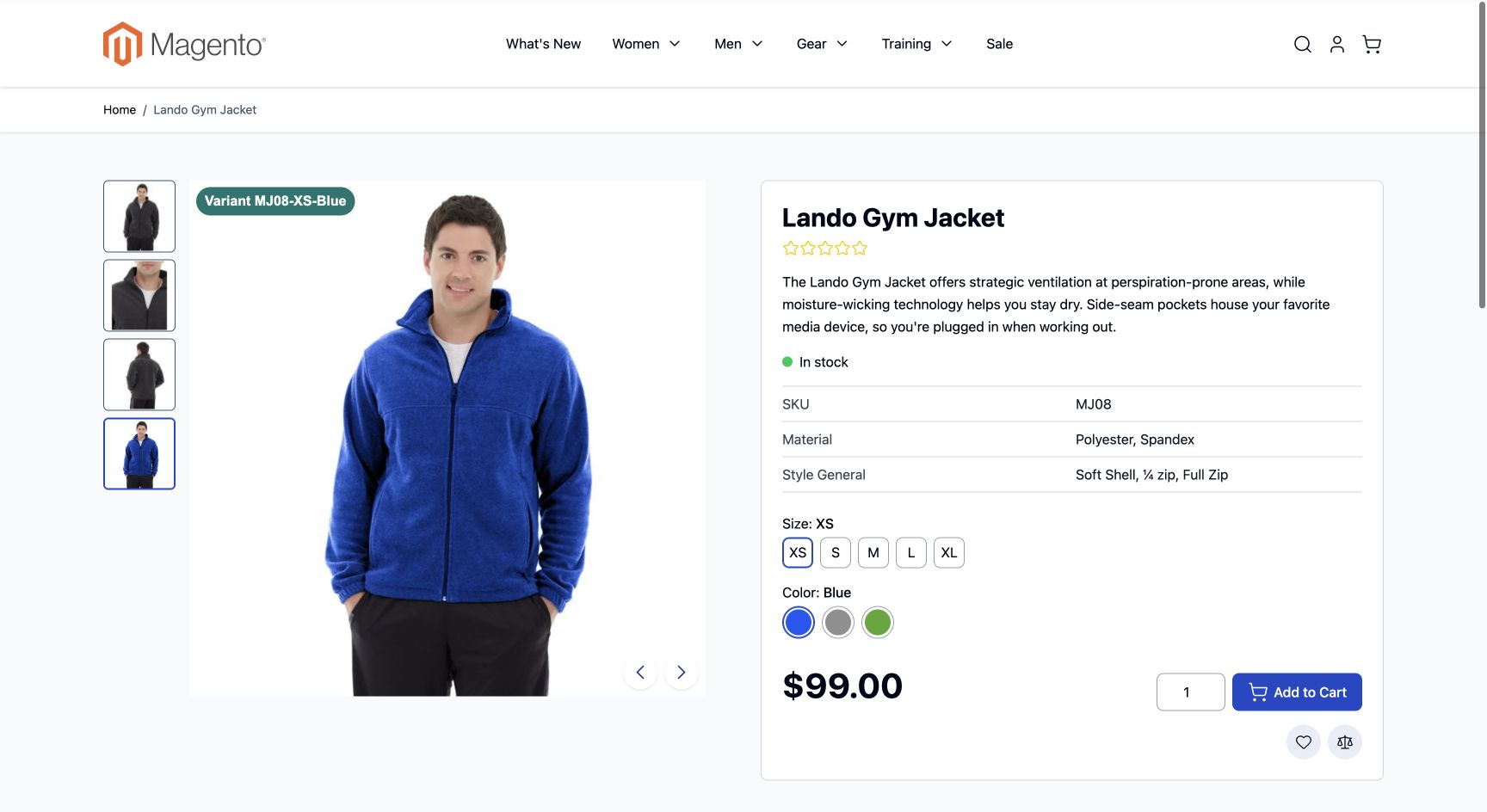
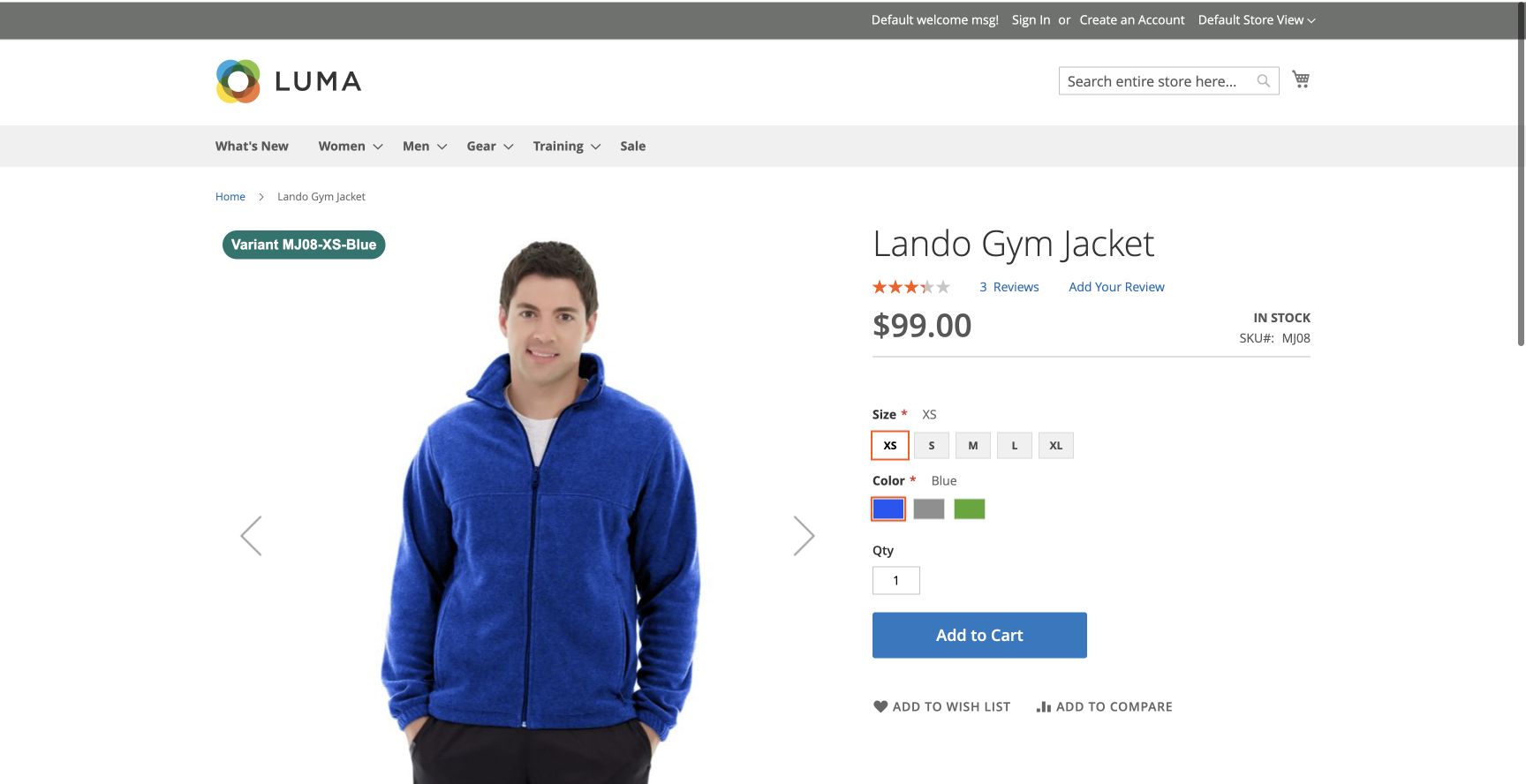
| Selected variant | Parent facts until one child is selected; clearing selection restores the parent. |
| Always parent | Parent facts remain after size/colour selection. |
| Any eligible variant | Enabled salable matching children are considered; the largest whole discount percentage wins, with product ID order for ties. |
For an any-variant discount badge, use Up to {{discount_percent}}% off. Every condition and text value comes from that same matching child; prices from different children are never combined. Preview a configurable parent SKU to inspect the policy. A standalone simple-SKU preview has no selected parent context.
6. Preview and explain
Choose a SKU, store view, customer group and placement, then Preview and Explain. The draft is evaluated alongside saved campaigns without being published. Reports show selected, suppressed and non-matching campaigns, actual leaf values, schedule/scope exclusions, priority blockers and stacking notices. A disabled store setting is called out explicitly.
7. Scan products and overlaps
Choose Scan Campaign Products and Conflicts. The submitted draft is evaluated in 25-product pages; totals show scanned, matching, selected, suppressed and overlapping products. Up to 20 matching sample SKUs and per-campaign overlaps are shown. Overlap means another campaign also matches, not necessarily a visual collision.
Counts cover enabled, individually visible products in the selected store. Hidden simple variants are evaluated through their parent policy. Disabled drafts, dates and targeting are respected. Stop Scan completes the current request and marks totals partial. Errors mark the scan incomplete. This is a live scan, not a frozen snapshot or a background index; rerun if catalog/campaign inputs change.
8. Text variables and pricing
{{discount_percent}}, {{discount_amount}}, {{regular_price}}, {{final_price}}, {{stock_qty}}, {{sku}}, {{name}} and {{attribute:manufacturer}} are supported. Attribute variables use frontend labels; conditions use stored values. Text is escaped.
Prices reflect the current display currency and catalog/product pricing, not cart coupons or quantity changes. Percentage discounts round down to whole numbers. Amounts have up to two decimals and do not add a currency symbol automatically; add an appropriate symbol/code and scope by store. This module displays offers; it does not create discounts.
9. Import, export and caching
Export downloads versioned JSON. Import validates the whole document, creates new disabled copies and never overwrites existing campaigns. Limits: 2 MB / 100 campaigns. Artwork is referenced, not embedded: copy pub/media/magedia/product_labels or upload replacements. Review store, group and attribute IDs on the destination. Competitor formats are not imported automatically.
Initial badges are server-rendered. A private, uncached same-origin endpoint refreshes up to 48 products per request at the configured interval and after variant changes. Campaign/configuration changes invalidate rendered blocks and tagged pages. Custom design CSS uses an external stylesheet and refreshes when its fingerprint changes. With JavaScript/network blocked, initial HTML remains until page regeneration.
10. Troubleshooting and theme integration
No badge: check the store setting, campaign status, dates, scopes, placement and preview explanations. No stock on a configurable parent: select a simple variant or use the any-eligible policy. Wrong position: verify the theme's image/gallery integration. Custom cards that bypass Magento image blocks need Magedia\ProductLabels\ViewModel\Labels.
Built-in support covers Luma and current Hyvä image/gallery paths. Replacement sliders, fullscreen galleries and third-party cards may require integration. No cart/checkout renderer, GraphQL, attribution/A-B testing, arbitrary CSS, competitor importer or background index is included.