Product Tabs
Download the illustrated user guide (PDF)
Open storefront demo · Open admin demo (demo / demo). Public demo changes reset daily at 03:00 UTC. Screenshots below were captured on the local Magento test installation.
Buy Product Tabs on the Magedia store. Composer access and downloads come with your purchase under Account → Keys.
Manage the information on product pages from one place. Create shared tabs, target products with rules, edit built-in tabs, and override content for individual products and store views.
Installation
The package is magedia/m2-product-tabs. It requires Magedia Core 1.2 or later within major version 1, PHP 8.3–8.5, and a compatible Magento 2.4 installation. The development bench uses Magento Open Source 2.4.9 and PHP 8.4.
composer require magedia/m2-product-tabs
bin/magento module:enable Magedia_Core Magedia_ProductTabs
bin/magento setup:upgrade
bin/magento setup:di:compile
bin/magento setup:static-content:deploy -f
bin/magento cache:flush
For the Magedia Composer repository, use your Account → Keys credentials in Composer authentication. Do not add credentials to source control. Configure Magento cron.
Where to start
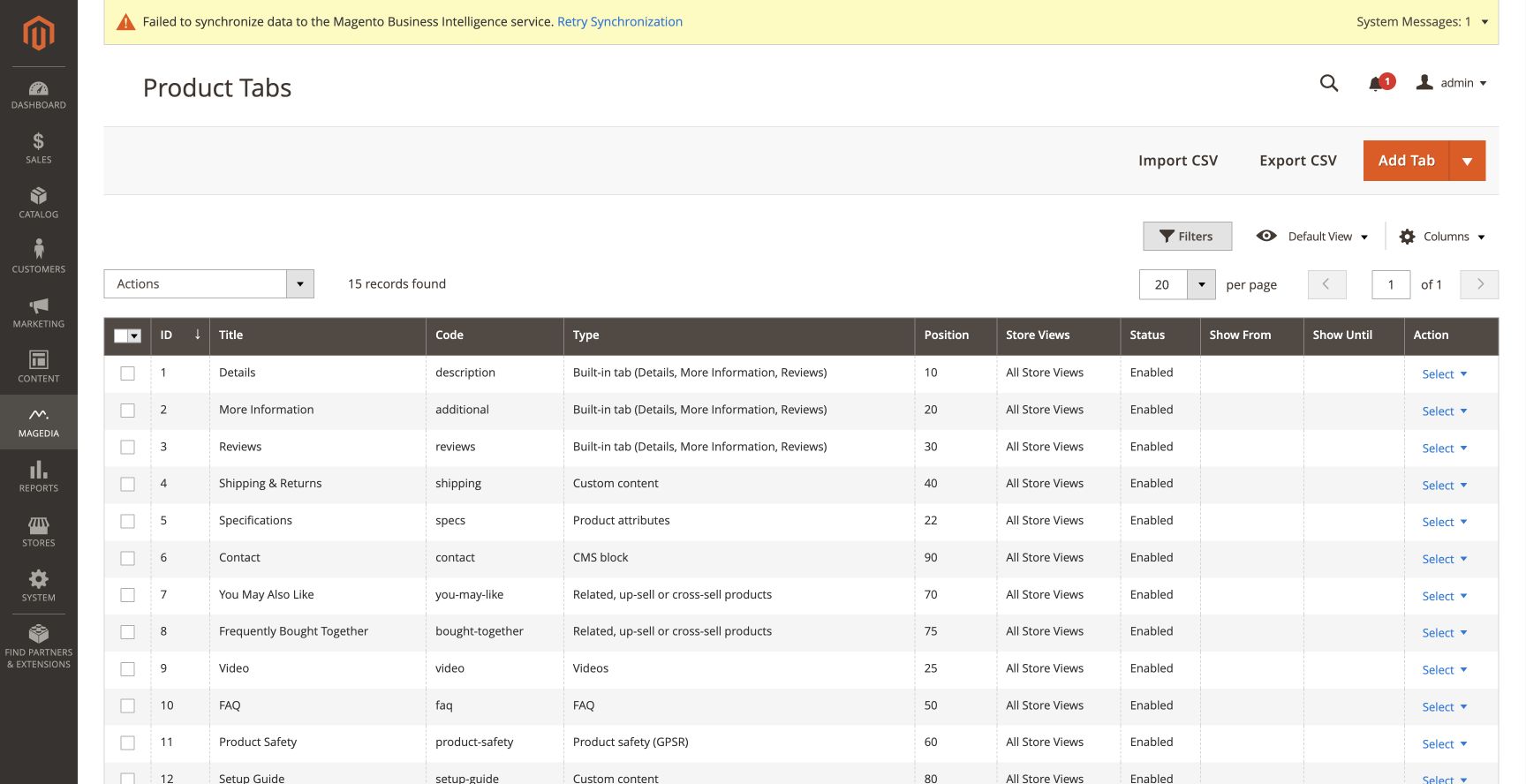
Open Magedia → Product Tabs → Tabs. Configure the layout under Stores → Configuration → Magedia Extensions → Product Tabs. The three initial records manage Details, More Information and Reviews.
Installing the extension retains the normal product information tabs. Custom template copies start as disabled drafts. Replace all example sizes, delivery promises and warranty terms before enabling them.
Contents
1. Create and manage tabs · 2. Content types · 3. Targeting and schedules · 4. Product overrides · 5. Layouts and themes · 6. FAQ and product safety · 7. Private content and video · 8. AI drafts · 9. Import/export and APIs · 10. Troubleshooting.
1. Create and manage tabs
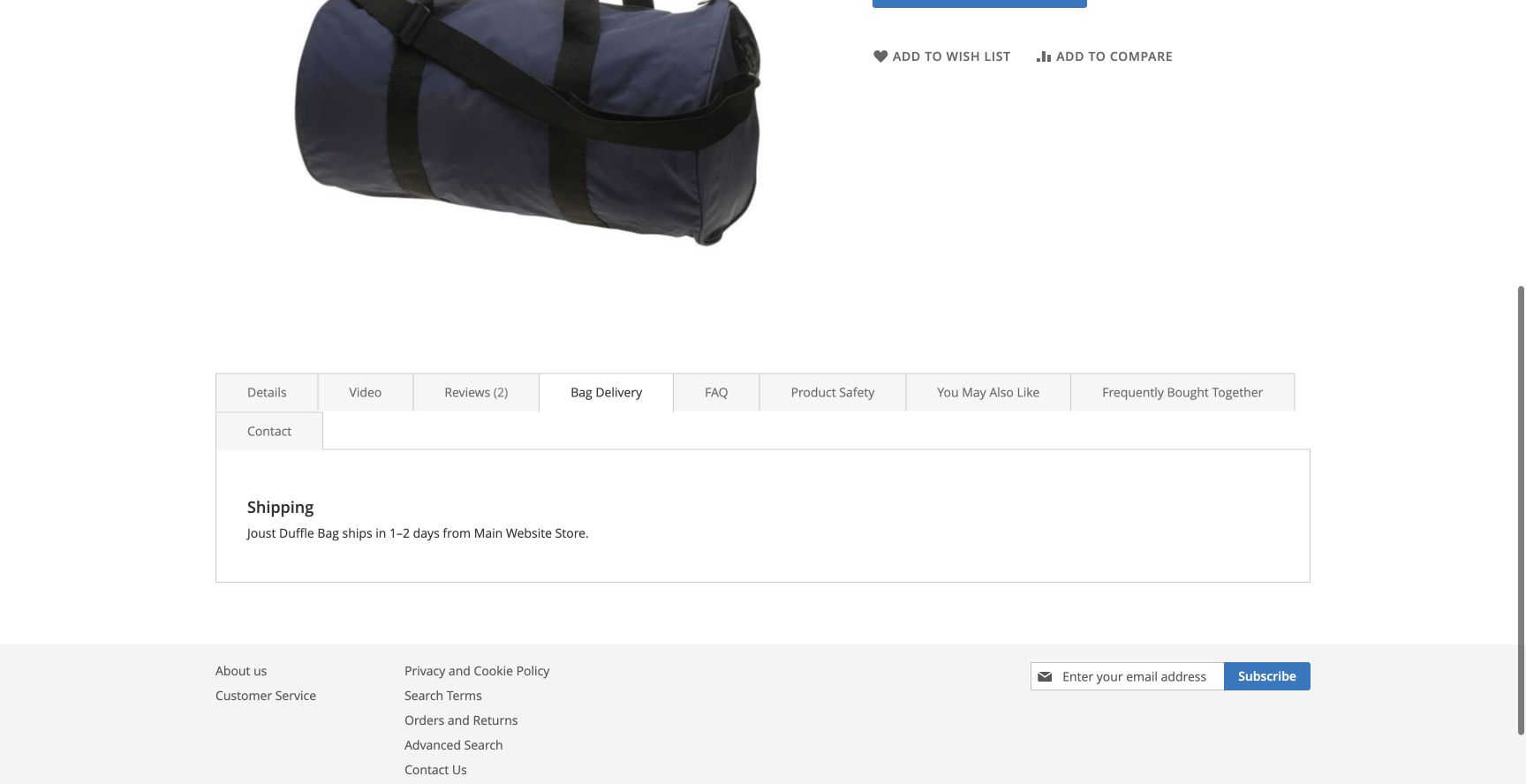
- Choose Add Tab for a blank tab, or open its arrow menu to copy a template.
- Enter the title and a unique code. The code becomes the link anchor, for example
#shipping. It must begin with a lowercase letter and contain only lowercase letters, digits, hyphens and underscores. - Choose a type and fill its content fields.
- Set Position. Lower numbers come first; initial built-in tabs use 10, 20 and 30.
- Set store views, customer groups, product conditions and optional dates.
- Save the tab. Enable it once the content is reviewed.
Templates
Shipping & Returns, Size Chart, Warranty, Care Instructions, FAQ, Product Safety, Video, Specifications, Related Products, Up-sell Products and Cross-sell Products provide a starting point. Their example content is editable.
Managing records
The grid supports filters, editing, duplicate, delete, enable/disable, and selected-record actions. Select All honors the active grid filters. A duplicate is disabled until you enable it. Deleting a tab also removes its product overrides.
Built-in tabs
A Built-in Tab record uses a layout alias, such as description, additional or reviews. Disable the record to hide that tab. To rename its title globally, turn off Use Native Title and enter your title. Product and store-view title overrides take precedence over the native title.
Deleting a built-in record returns control to the theme. Other extensions’ unmanaged tabs remain in the product page’s detailed-information group.
2. Content types
| Type | What to enter |
|---|---|
| Custom content | HTML in Magento’s WYSIWYG or Page Builder editor. CMS directives and widgets are supported. |
| Product attributes | Choose the attributes to display. An empty list shows attributes marked Visible on Catalog Pages on Storefront. |
| CMS block | Choose a block by identifier. Each store view uses its assigned active block. |
| Linked products | Related, up-sell or cross-sell products; set the maximum count and optionally hide the theme’s original related/up-sell list. |
| Videos | One supported YouTube or Vimeo URL per line. The player opens after a click. |
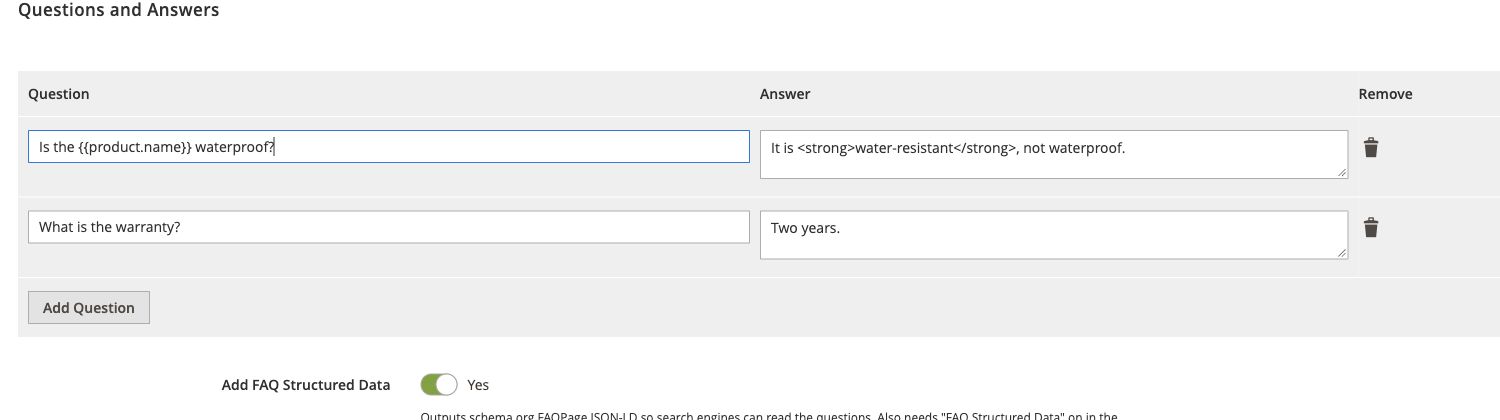
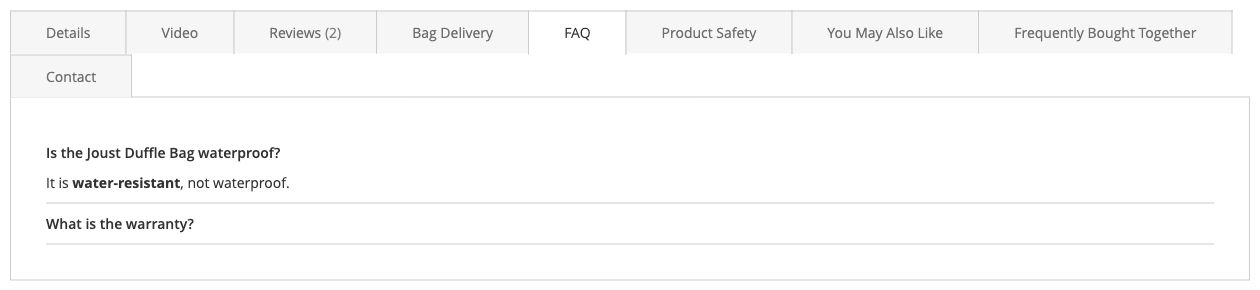
| FAQ | Question/answer rows, with optional FAQPage structured data. |
| Product safety | Uses the product’s GPSR fields and configured store defaults. |
| Built-in tab | A product-detail layout alias, such as description, additional or reviews. |
Variables
Use {{product.name}}, {{product.sku}}, {{product.attribute_code}}, {{store.name}} and {{store.code}} in titles and custom content. FAQ questions and answers support these variables too. Attribute option labels are displayed instead of numeric option IDs.
For example: Care for {{product.name}}. An unknown or empty attribute becomes empty text. Product variables are escaped before CMS directive filtering.
Empty tabs
Tabs with no rendered content are omitted. Deferred tabs are evaluated when requested. Built-in reviews depend on Magento’s review configuration and theme blocks.
3. Targeting and schedules
Store views and customer groups
Choose All Store Views or specific views. Leave Customer Groups empty to show the tab to every group. Magento’s customer-group cache context keeps group-targeted pages separate.
Product conditions
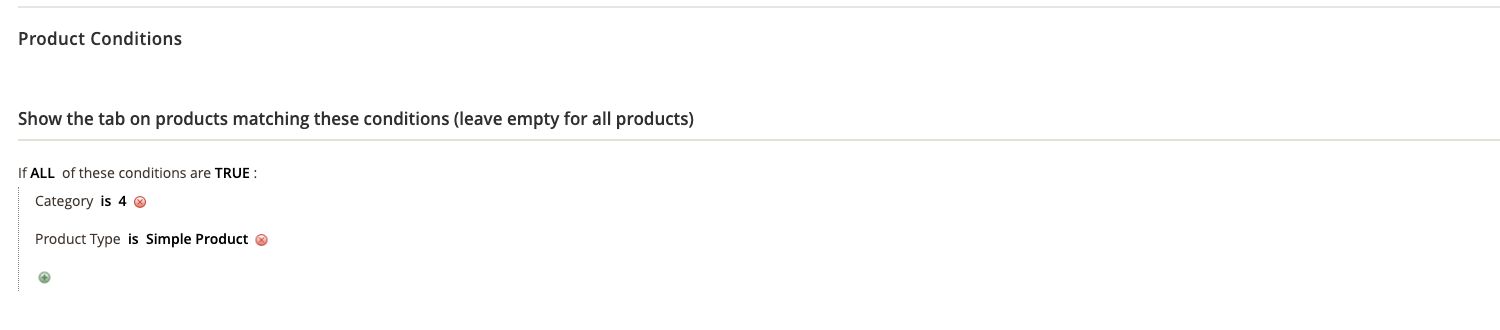
Use the condition tree to combine SKU, category, attribute set, product type and visible product attribute conditions. ALL/ANY and TRUE/FALSE control how conditions combine. An empty condition tree matches all products.
Dates
Show From and Show Until are dates in the store view’s time zone. Show Until includes the whole specified day. The scheduled-tab cron job clears affected product page caches after a date boundary is crossed. Cron runs hourly, so allow up to an hour for an already cached page to reflect a scheduled change.
Manual assignment
Enable Only Products Enabled in the Product Form to show the tab only where a product override selects Always Show. This bypasses product conditions but does not bypass disabled status, store views, customer groups, dates or private access rules.
Adobe Commerce B2B
Shared catalogs can be targeted through their customer groups. For a specific company, enter comma-separated company IDs in Adobe Commerce Company IDs. This requires Magento Company and applies only after sign-in. Company-restricted content is fetched privately; it does not enter the shared page cache. On Open Source, company-only tabs are unavailable.
4. Product overrides
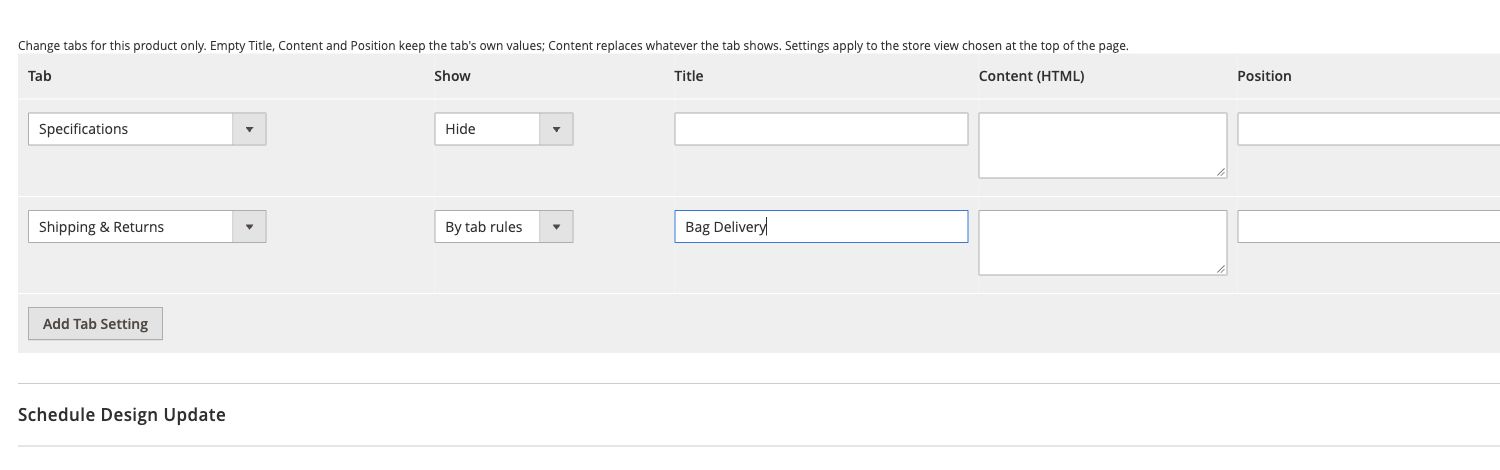
Open a product, expand Product Tabs, and add an override row. Choose the tab and Default, Always Show or Hide. Optionally replace the title, custom content or position. Save the product.
All Store Views provides a fallback. A store-view row replaces that tab’s fallback row; remove the store-view row to inherit again. Blank override values keep the tab’s own values. Override content is rendered as custom content, regardless of the original type.
5. Layouts and themes
Select Tabs, Accordion or All Sections Expanded in configuration. The tabs layout becomes an accordion on smaller screens. Open When the Page Loads chooses the initial tab; if several are marked, the first eligible tab wins.
Navigation and accessibility
Use a direct anchor such as product.html#shipping. Tabs support keyboard navigation; Hyvä tab buttons support Left/Right, Home and End. FAQ disclosure controls use native HTML details/summary elements.
Theme integration
Luma uses Magento’s tab widget and the normal product detail group. Hyvä uses separate layout handles and Alpine templates. Breeze uses the same Luma-compatible markup with its documented compatibility mode. Custom themes may need to adapt their block aliases or product-detail layout.
6. FAQ and product safety
FAQ structured data
Enable Add FAQ Structured Data on the tab and FAQ Structured Data in configuration. Structured data is emitted only for visible, server-rendered FAQ content. Deferred or private FAQ content is not advertised in the page’s JSON-LD.
When SEO Toolkit and its structured-data/FAQ switches are enabled, it owns the product FAQPage document. Product Tabs supplies the public questions, avoiding duplicate documents. Without SEO Toolkit, Product Tabs renders its own FAQ schema. Overriding a FAQ tab’s content replaces its FAQ data with custom HTML.
Product safety (GPSR)
Fill Manufacturer, Responsible Person in the EU, Safety Information and Warnings, and Safety Documents in the product’s Product Safety group. Store-level defaults can fill missing manufacturer, responsible-person and warning text.
Enter documents as Label | https://example.com/manual.pdf, one per line. Only HTTP(S) or site-relative links are accepted. The product SKU is displayed as its identifier. The tab provides fields for your product-safety information; review the information for the products and markets you serve.
7. Private content and video
Only for buyers
Enable Only for Customers Who Bought the Product for setup guides or post-purchase information. A signed-in customer needs a processing or complete order containing that product. Guest purchases are not linked to a customer account automatically. Canceled, pending-payment and refunded/closed orders do not qualify.
The shared HTML contains a hidden placeholder, not private content. The deferred endpoint checks product visibility, store assignment, customer group, tab rules, purchase history and company membership again. Its response uses private/no-store cache headers.
Load Content When Opened
Use this option for heavy tabs. It loads once when opened; private tabs are rechecked after customer-data changes. Search engines may not index deferred content, so keep useful product information server-rendered. Built-in tabs cannot use this option because their blocks exist in the product-page layout.
Video privacy
YouTube uses youtube-nocookie.com and Vimeo receives its do-not-track option. Players are not loaded until the visitor presses play. Thumbnail loading is optional and off by default; turning it on may request images from YouTube before playback.
8. AI drafts
- In configuration, enable AI Drafts and choose Anthropic, OpenAI or Gemini.
- Add your own API key. It is stored through Magento’s encrypted backend model.
- Enter a model name for OpenAI/Gemini; Anthropic has a configured default that can be overridden.
- In a Custom Content tab, describe the text and optionally supply a product SKU.
- Choose Write Draft. Review and edit the result, then save the tab yourself.
Only this action sends the instructions and supplied product facts to the chosen provider. Generated HTML is restricted to basic formatting and tables, without scripts, event handlers or links. Placeholders in square brackets need your details. No paid external API call is made automatically.
9. Import/export and APIs
CSV
Use Import CSV or Export CSV on the tabs grid. The first row contains column names, including code, title and type. Rows match existing records by code; reimporting updates those records. Store views are exported by code so files can move between environments. Settings, conditions and store-view labels are JSON columns. Product overrides are not exported.
bin/magento magedia:product-tabs:export var/tabs.csv
bin/magento magedia:product-tabs:import var/tabs.csv
Import reports row-level validation failures and continues with valid rows. Back up your configuration before bulk imports.
REST
Authenticated administrators/integrations with Product Tabs permissions can list, get, create, update and delete records through /V1/magedia/product-tabs. Use /:tabId for GET, PUT and DELETE. The URL ID controls updates and conflicting body IDs are rejected.
/V1/magedia/products/:sku/tabs renders tabs for a store and customer group. This is an administrative integration endpoint, not an anonymous storefront endpoint; buyer/company content is included for trusted integrations.
GraphQL
{
  products(filter: { sku: { eq: "YOUR-SKU" } }) {
    items {
      magedia_product_tabs {
        code title type content sort_order open_by_default
        faq { question answer }
      }
    }
  }
}
The current store and authenticated customer determine eligibility. Unauthorized buyer/company content is omitted. Magento GraphQL is optional for stores using ordinary product pages.
10. Troubleshooting
A tab is missing: check status, store views, group, schedule, conditions, product overrides and empty content. Buyer/company tabs require sign-in and qualifying access.
Changes appear late: check cron and page-cache configuration. Saving tabs purges tagged product pages, including Varnish when Magento’s purge integration is configured.
An AI draft fails: check the key/model and provider availability. No content is saved on failure.
A theme uses different block names: adapt its detailed-information group and linked-product block aliases. Test before publishing compatibility claims.
Support: magedia.com. Supply the Magento/PHP/theme versions, relevant settings and a reproducible example. Do not share API keys.